7 Tips for Smart Home Features in Modular Homes?

Time:2026-09-23 Author:Isabella
0%

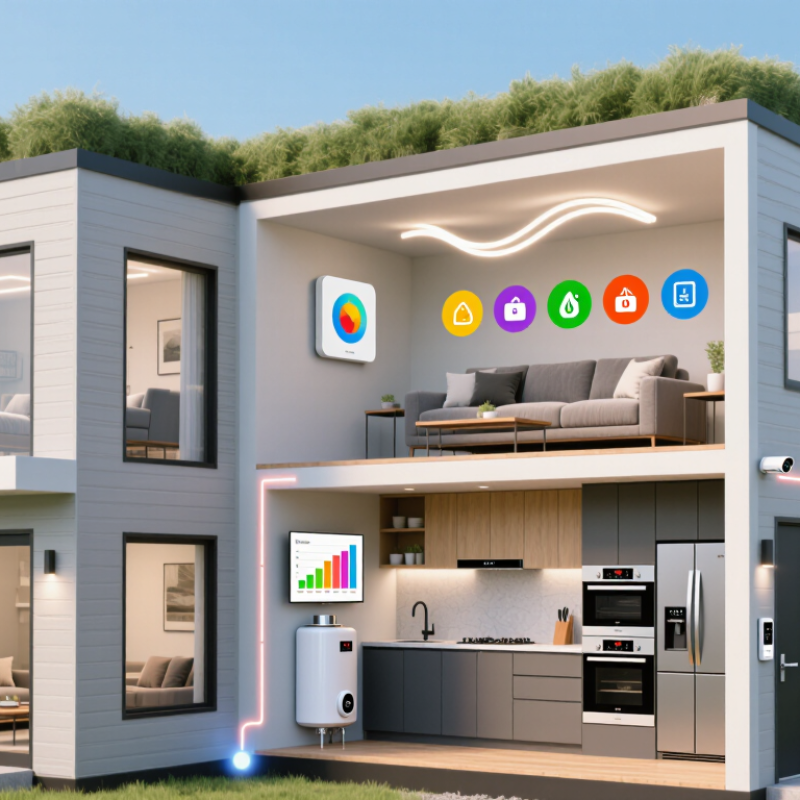
Designing a modular home today involves more than choosing cabinets, flooring, and wall finishes. Homeowners also want lighting that responds to movement, thermostats that learn daily routines, and security systems that provide clear alerts. This raises an important question: what smart home features can be integrated into modular homes without creating expensive complications?

According to smart-home consultant Avi Rosenthal, “The best smart home technology should reduce daily effort, not add another layer of work.” That principle matters in modular construction. Wiring plans, control hubs, sensors, and network access should be considered before factory production begins. A motion sensor near the entry can activate soft lighting, while a leak detector beside the water heater can send an alert before a small problem becomes structural damage. These details feel practical, not decorative.

This guide explores seven smart home features that suit modular homes, including energy monitoring, automated lighting, connected appliances, climate control, and stronger access management. It also considers compatibility, maintenance, privacy, and future upgrades. A system may look impressive on installation day, yet become frustrating if its app stops receiving updates. That risk deserves attention.

The most reliable approach combines simple controls with professional installation and clearly documented wiring. Modular homes can be efficient, comfortable, and intelligent. They are not automatically smart, though. Good planning makes the difference.
7 Tips for Smart Home Features in Modular Homes?

Understanding Smart Home Systems in Modular Homes

7 Tips for Smart Home Features in Modular Homes?

Understanding Smart Home Systems in Modular Homes

Smart home systems in modular homes should be planned before the modules leave the factory. Start with a central network location, preferably near power and service access. Use wired connections for fixed devices when possible. Wireless signals can weaken through dense wall materials and metal framing. Test coverage in every room, including the garage and outdoor entrance. Small gaps matter.

Choose devices that communicate through compatible standards. This reduces confusing controls and limits future replacement problems. Install smart lighting in high-use areas, such as hallways, kitchens, and bedrooms. Add sensors for doors, water leaks, temperature, and indoor air quality. Keep manual switches available. Technology should not become the only option. Plan electrical circuits with extra capacity for later additions. Modular homes can change quickly, but rushed upgrades become expensive.

Protect the system with strong, unique passwords and automatic security updates. Place the main controller where residents can reach it, not inside a sealed cabinet. Ask the installer to document wiring, device locations, and reset procedures. This record supports safer repairs and clearer maintenance. Test alerts before trusting them. A water sensor that is never tested is only an assumption. I have seen homeowners over-automate simple tasks, then avoid using the system. That is a useful warning. Comfort improves when features remain understandable, accessible, and easy to override.

Planning Wiring, Connectivity, and Device Compatibility

Smart features work best when modular homes are planned as connected systems, not decorated later. Plan seven details early: conduit routes, spare electrical capacity, Ethernet paths, wireless access points, sensor locations, device standards, and service access. The National Institute of Standards and Technology recommends defining cybersecurity capabilities before connected devices are purchased. Leave an accessible wiring cabinet. Add empty conduit to ceilings and exterior walls. It may look excessive now.

Connectivity needs careful physical planning. Run Ethernet to living areas, offices, utility spaces, and the main communications cabinet. Use wired links for cameras, televisions, and fixed control panels. Reserve wireless connections for mobile sensors and temporary devices. Parks Associates’ recent smart-home research shows that many U.S. internet households now use multiple connected devices, increasing network-management demands. A single router may struggle across several factory-built modules. Test signal strength after placement, not only on the drawing.

Compatibility deserves equal attention. Select devices that support common communication standards and documented local control. Confirm voltage, neutral-wire requirements, mounting depth, and software-support periods. The International Energy Agency reports that buildings consume about 30% of global final energy, so energy monitoring deserves a dedicated circuit plan. Install metering where loads can be separated. Label every cable. Photograph concealed routes before walls close. Review the plan with an electrician and a network professional. Even experienced teams miss something. Future upgrades are easier when the home can accept new equipment without opening finished walls.

Choosing Energy-Saving Controls for Everyday Comfort

7 Tips for Smart Home Features in Modular Homes

Energy-saving controls should make daily routines easier, not more complicated. Tip 1: Choose a programmable thermostat with room-based scheduling. Set warmer or cooler periods around real occupancy. Tip 2: Use occupancy sensors in hallways, bathrooms, and utility areas. They can turn lights off after movement stops. Keep a manual switch available. Automation sometimes guesses wrong.

Tip 3: Install daylight-sensitive lighting controls near large windows. They can reduce unnecessary lighting during bright mornings. Tip 4: Monitor electricity use through a simple energy display. Check evening peaks, heating cycles, and standby loads each week. An electrician should verify wiring and control compatibility before installation. In modular construction, factory-fitted systems may need careful adjustment after delivery.

Tip 5: Add smart control to water heating, but protect hygiene and safe temperatures. Tip 6: Use ventilation controls linked to humidity, especially after showers or cooking. Quiet operation matters; people often disable noisy systems. Tip 7: Create practical scenes, such as “away” and “sleep,” without controlling everything at once. I once assumed a fully automated schedule would save the most energy. It did not. Our changing routine caused repeated heating and cooling. A simpler schedule worked better. Review settings monthly, and question any feature that adds comfort only on paper.

7 Tips for Smart Home Features in Modular Homes: Choosing Energy-Saving Controls for Everyday Comfort

Estimated energy-saving potential of practical smart-home controls. Values represent typical reductions in the related energy use, not guaranteed whole-home savings.

Smart thermostats can reduce heating and cooling demand through scheduling, occupancy sensors can limit unnecessary lighting, and automated blinds can reduce solar heat gain. Actual results depend on climate, building envelope, settings, and household behavior.

Improving Security, Safety, and Remote Home Access

Smart-home features can make modular homes safer and easier to manage, especially when owners are away. However, convenience should not replace practical planning. The National Fire Protection Association reports that three out of five home-fire deaths from 2017–2021 occurred where smoke alarms were missing or not operating. Remote access also needs strong controls. NIST’s IoT guidance recommends unique credentials, secure updates, and protected data.

Tip 1: Install interconnected smoke and carbon-monoxide alarms, including near sleeping areas. Test them after installation and during seasonal inspections.

Tip 2: Use exterior lighting, door sensors, and visible cameras to discourage unwanted entry.

Tip 3: Require multi-factor authentication for remote access. A password alone is weak protection.

Tip 4: Keep the home network separate from guest devices. This small step reduces unnecessary exposure.

Tip 5: Choose devices that receive documented security updates. NISTIR 8259A emphasizes clear support and vulnerability-management practices.

Tip 6: Create temporary access codes for contractors, cleaners, or relatives. Delete them immediately after use.

Tip 7: Add a manual backup for critical systems, such as a physical key and local alarm control. Remote apps can fail during outages. That matters.

During commissioning, owners should test notifications from outside the property, not only beside the control panel. A delayed alert may reveal poor connectivity or incorrect settings. No smart system is perfect. Batteries expire, networks fail, and cameras can miss events. Review access logs monthly, update emergency contacts, and document who can control each feature. According to the FBI’s 2023 crime data, burglary remains a serious property concern, making layered protection more reliable than any single device.

Managing Installation Costs, Privacy, and Future Upgrades

Smart-home planning in a modular home starts before factory production. Ask for a wiring map before walls are closed. Add empty conduits near ceilings, doors, and the utility room. They create upgrade paths without expensive demolition. Select standard wiring and replaceable components where possible. Avoid paying for every feature immediately. A licensed electrician should confirm load capacity, ventilation, and local code requirements. Request separate pricing for equipment, installation, testing, and future service. Small details matter.

Privacy needs a room-by-room plan. Keep microphones and cameras away from bedrooms, bathrooms, and private workspaces. Use physical shutter controls when available. Prefer systems that can operate locally during internet outages. Change default passwords immediately. Limit household access by role, not convenience. Explain data storage clearly to every resident. A secure network, updated firmware, and two-factor authentication reduce avoidable exposure. Technology should serve the household, not constantly observe it.

Future upgrades deserve equal attention. Leave space in the electrical panel and provide spare network ports. Label every cable with its destination and installation date. Store diagrams, manuals, and test records in a dry, accessible file. Ask how replacement parts will be sourced several years later. During site reviews, a recurring mistake is underestimating labor for small changes. I would budget a contingency of around fifteen percent, although local costs vary. Not every planned feature will remain useful. A flexible foundation is often wiser than a crowded control panel.

FAQS

When should smart-home wiring be planned in a modular home?

Plan it before factory production. Add conduits before walls close. Late changes can become expensive.

Where should Ethernet connections be installed?

Run Ethernet to living areas, offices, utility spaces, and the communications cabinet. Use wired links for cameras and fixed control panels. Wireless suits mobile sensors better.

Is one wireless router enough for several modules?

Not always. Metal structures and separate modules may weaken signals. Test coverage after placement, not only on drawings.

What should an accessible wiring cabinet contain?

Leave space for cables, switches, and future equipment. Label every cable with its destination and installation date. Photograph hidden routes before closing walls.

How can device compatibility be checked?

Confirm communication standards, voltage, neutral-wire needs, and mounting depth. Check software-support periods before buying. Documented local control is useful during internet outages.

How should privacy be protected inside the home?

Keep cameras and microphones away from bedrooms, bathrooms, and private workspaces. Use physical shutters when available. Change default passwords immediately.

What electrical planning supports energy monitoring?

Reserve separate circuits for major loads and monitoring equipment. Leave spare capacity in the electrical panel. Small planning errors can limit future measurements.

How can installation costs remain manageable?

Request separate prices for equipment, installation, testing, and future service. Use replaceable components where possible. I might overplan some features.

What should be prepared for future upgrades?

Add empty conduits near ceilings, doors, and utility spaces. Keep spare network ports and accessible service space. A flexible foundation often beats a crowded control panel.

How much extra budget should be considered?

A contingency near fifteen percent may help with small changes. Local labor costs vary widely. Even experienced teams miss something.

Conclusion

Smart home technology can make modular living more comfortable, efficient, and secure when it is planned from the beginning. This guide explores what smart home features can be integrated into modular homes, including connected lighting, temperature controls, automated blinds, energy monitoring, smart appliances, entry systems, cameras, smoke detection, and water-leak alerts. It also explains why early planning for wiring, wireless connectivity, control systems, and device compatibility is important for reliable daily operation.

The article highlights energy-saving controls that adjust settings according to routines and occupancy, helping create comfort while reducing unnecessary consumption. It also discusses remote access, safety notifications, privacy protection, and responsible management of personal data. Finally, readers will learn how to evaluate installation costs, choose practical features for their needs, and prepare the home for future upgrades without major remodeling. Thoughtful planning can help create a flexible smart home system that grows with changing lifestyles and technology.

Isabella

Isabella

Isabella is a dedicated marketing professional with a sharp focus on driving brand growth and engagement through strategic content creation. With an extensive background in digital marketing, she combines her passion for storytelling with her keen understanding of industry trends to deliver......